This week I designed my very own game on my own without tutorials from scratch. I had a hard time deciding what kind of game I wanted to design, but I figured my classmates were going to be the ones who looked at it the most so I made a game that would appeal to them. I'll let you play the game first, and then you can read about how I did it. Enjoy!
I realized a few things this week. On Scratch, you have a small window that you have sprites move through. It may appear that the screen is moving, but it is actually only the sprites moving in a certain direction to make it appear as if the screen is moving. I had to realize this before I started my game because most games need objects to come in and out of the screen for it to be fun.
This game took me quite a while. I kept getting stuck on figuring out how to make the game work. First, I had to figure out how to make the red lines move across the screen. If the otter hits any of the red lines I had to figure out how to make the game end. Originally I had the words next to the red lines in red as well, but if the otter hit the words in red it ended the game. Therefore, I had to change the words to white. Figuring out how to add a timer to keep score was a challenge as well. I had to look up how to add a timer, and then figure out how to make the timer stop when the otter hit a red line. (I added my resources to my 20Time Pinterest board on how to add a timer). I also had to figure out how the user can move the otter to avoid the red lines. The ocean background doesn't help the visual illusion that the otter is moving through the ocean, but I haven't figured out how to do that part yet. I feel really good about this game, but I know the next two weeks are going to be challenging because taking a game to the next level is a huge leap. I spent more time on this game than on any of the work I've done in past weeks. I caught myself taking breaks and then coming back with new ideas of how to make it better. I can see how people can get caught up in making their game "perfect" because there's so many things you can manipulate, add and change. I hope to add a "high score" variable (which looks really hard) next week and to make the game look more realistic. I will be making a game next week that is suited for a larger audience, but I thought I would start small this week.
Below I have screen shots of the coding patterns for each sprite. The otter was one sprite, all the red lines at the top of the screen were another sprite and the last sprite was the red lines on the bottom of the screen. I just had the lines change "costume," move across the screen by gliding and disappear. I've learned so much about how to make a game using Scratch. I can't wait to support my students in their learning next year.
This game took me quite a while. I kept getting stuck on figuring out how to make the game work. First, I had to figure out how to make the red lines move across the screen. If the otter hits any of the red lines I had to figure out how to make the game end. Originally I had the words next to the red lines in red as well, but if the otter hit the words in red it ended the game. Therefore, I had to change the words to white. Figuring out how to add a timer to keep score was a challenge as well. I had to look up how to add a timer, and then figure out how to make the timer stop when the otter hit a red line. (I added my resources to my 20Time Pinterest board on how to add a timer). I also had to figure out how the user can move the otter to avoid the red lines. The ocean background doesn't help the visual illusion that the otter is moving through the ocean, but I haven't figured out how to do that part yet. I feel really good about this game, but I know the next two weeks are going to be challenging because taking a game to the next level is a huge leap. I spent more time on this game than on any of the work I've done in past weeks. I caught myself taking breaks and then coming back with new ideas of how to make it better. I can see how people can get caught up in making their game "perfect" because there's so many things you can manipulate, add and change. I hope to add a "high score" variable (which looks really hard) next week and to make the game look more realistic. I will be making a game next week that is suited for a larger audience, but I thought I would start small this week.
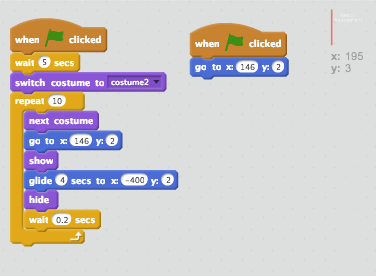
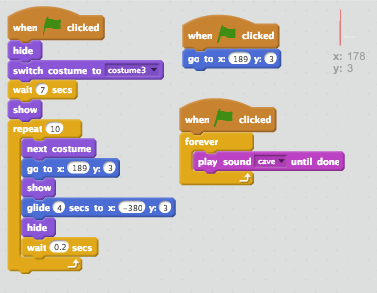
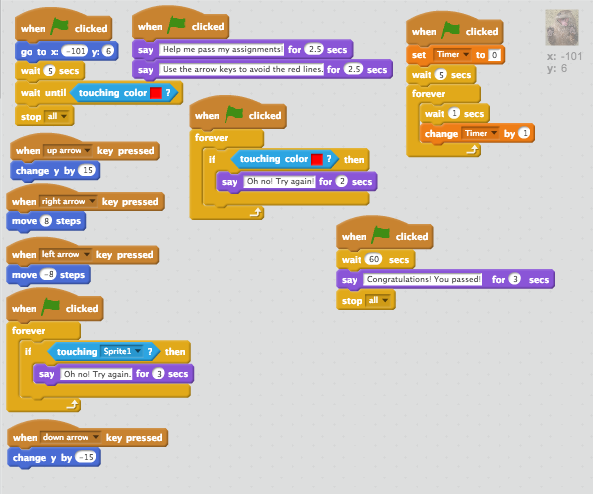
Below I have screen shots of the coding patterns for each sprite. The otter was one sprite, all the red lines at the top of the screen were another sprite and the last sprite was the red lines on the bottom of the screen. I just had the lines change "costume," move across the screen by gliding and disappear. I've learned so much about how to make a game using Scratch. I can't wait to support my students in their learning next year.