As I logged into Scratch this week to begin my new game for week 4, a prompt appeared that asked me if I wanted to become a Scratcher. Basically, it looks like if you work on Scratch for a certain period (I have been on here for about a month) and/or complete a certain number of projects, you get special privileges. I noticed that I didn't have access to the "cloud variable" option which is used to keep score until I became a Scratcher this week. I was wondering how to add a cloud variable! It's nice that they only allow you to become a Scratcher if you are "respectful, constructive, give credit and help keep the site friendly." You also have the option to opt out of being a Scratcher, but I chose "I agree!"

I've noticed over the last three weeks that creating and finishing an entire game in one week takes a lot of work. It's a lot of trial and error and takes fine tuning to make a game great. So what I decided was that my last two weeks for this project would be focused on making only one game, but making it really good. I have the initial set up of the game so far with four levels and it progressively gets harder as you move through the levels.
I looked through the already created sprites that Scratch had and based a game off of those. I can create and add my own sprites, backgrounds, and sounds but they're hard to find and even harder to perfect. Therefore, I created a game that has a mouse as the main sprite that is trying to find and eat cheese. I had to create a cheese sprite and a cat sprite to make my game work. To create a sprite you have to find a picture online, size it correctly, and upload it. It took quite a bit of coding for this game and I sat there stumped quite a bit on why certain coding patterns didn't work. One of the most helpful things I realized this week was how to use the "if...then..." block. I found out you need to have the forever block around it so it is constantly checking for the "if...then..." situation. Otherwise it will only check for it once and most of the time the situation isn't happening right when you begin the game. I'm still struggling as to why it only works sometimes and not every time I use it, but I've only been on here for 4 weeks.
I looked through the already created sprites that Scratch had and based a game off of those. I can create and add my own sprites, backgrounds, and sounds but they're hard to find and even harder to perfect. Therefore, I created a game that has a mouse as the main sprite that is trying to find and eat cheese. I had to create a cheese sprite and a cat sprite to make my game work. To create a sprite you have to find a picture online, size it correctly, and upload it. It took quite a bit of coding for this game and I sat there stumped quite a bit on why certain coding patterns didn't work. One of the most helpful things I realized this week was how to use the "if...then..." block. I found out you need to have the forever block around it so it is constantly checking for the "if...then..." situation. Otherwise it will only check for it once and most of the time the situation isn't happening right when you begin the game. I'm still struggling as to why it only works sometimes and not every time I use it, but I've only been on here for 4 weeks.

I am really proud of this game (so far...it's still not done, so if you pass level 4 it gets messed up). This is the best one I've created so far. Please take a minute to play it and let me know what you think! I'll be working on the same game next week so any ideas would be greatly appreciated!
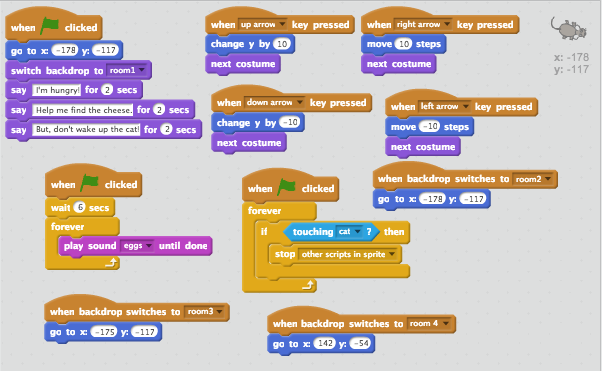
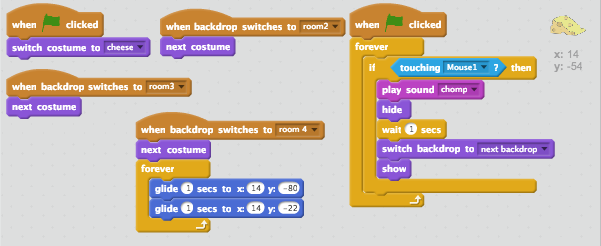
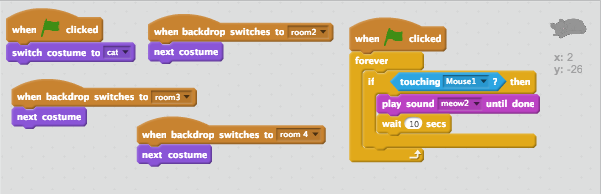
Here are the coding patterns for each of my sprites: the mouse, the cheese and the cat. For the cheese and the cat I had to find a picture online and then erase any white background behind it so it didn't appear with a big white square behind it in my game. The cat (as you can see in the game) isn't as well done, but I did my best.